
10 Ways AI is Changing How We Interact with PDFs in 2026
The humble PDF has been the backbone of digital documentation since the early 90s, but 2026 marks the historical turning point where it finally became "alive."
Gone are the days of static, boring documents that required hours of manual extraction and visual scanning. With the radical integration of Large Language Models (LLMs) and Semantic Processing, tools like PDF Legacy are fundamentally transforming how students, healthcare professionals, and enterprise developers handle digital paperwork.
If you are still manually reading 100-page reports or struggling with layout preservation while converting files, you are living in the past. 2026 has introduced a "Humanized" approach to document management that values your time more than ever. Here is a comprehensive deep dive into how AI is revolutionizing the PDF ecosystem this year.
The 10 AI Advancements Redefining Document Standards
1. Intelligent Document Chatting (Talk to Your Data)
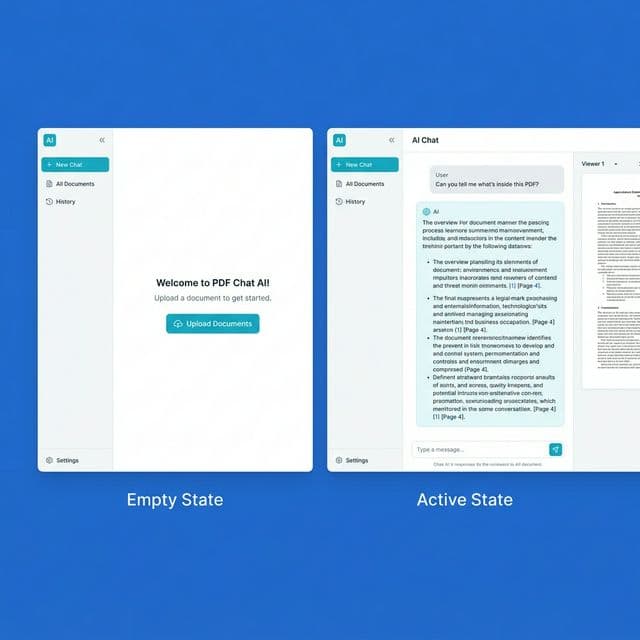
The single biggest breakthrough in 2026 is the mainstream adoption of "Conversational Intelligence" within static files. AI PDF Chat allows users to treat a document like a project partner.
Imagine asking, "What is the total quarterly revenue mentioned on page 87, and how does it compare to the forecast in the appendix?" and getting a verified, cited answer in 2 seconds. You no longer need to scroll; the AI handles the heavy lifting of contextual data cross-referencing.
2. AI-Powered Instant Summarization (Context Over Raw Text)
Time is the undisputed currency of 2026. AI PDF Summarizers have evolved beyond mere "shortening." They now perform Thematic Synthesis.
Modern summarizers can process a 500-page book or a complex legal contract and deliver an "Executive Overview" that highlights risks, opportunities, and key takeaways tailored to the user's expertise level. This is no longer just a trend; it is the gold standard for academic and legal research.
3. Context-Aware Layout-Preserving Translation
Translation in 2026 is no longer about word-for-word replacement. AI-integrated AI Translator tools now understand the hierarchical structure of a PDF.
Whether it’s a medical report or a blueprint, the AI preserves the exact spatial placement of text while adapting the technical terminology and cultural tone. It ensures that a "Safety Protocol" in German feels just as authoritative and accurate when translated to Japanese.
4. Automated Grammar, Tone, and Logical Flow Fixing
Submitting a PDF with logic gaps or typos is now considered entirely preventable. AI Grammar Fixers integrated directly into the workspace do more than just fix "SVO" errors.
They analyze the rhetorical structure of your document, suggesting tone shifts to make your business proposal more persuasive or your academic paper more objective. It ensures your professional correspondence is always "audit-ready" and globally compliant.
5. Smart AI OCR: From Image to Editable Insight
Standard Optical Character Recognition often failed with complex nested tables or hand-written annotations. The 2026 generation of AI OCR utilizes vision models to achieve 99.9% accuracy.
It transforms the messiest scanned images into fully searchable and structured Excel data or Word documents. For finance professionals, this means turning receipts and bank statements into ready-to-use CSV logs instantly.
6. AI-Driven Privacy: Autonomous Data Redaction
Security and privacy are paramount in the age of global data leaks. AI now helps users automatically identify sensitive PII (Personally Identifiable Information).
Before sharing a document, internal Identity Protection algorithms scan for Social Security numbers, private signatures, and banking details, offering to redact them with a single click. This makes secure document sharing a frictionless part of the modern workflow.
7. Semantic Search (Moving Beyond Ctrl+F)
Traditional search tools only find exact keyword matches. Semantic PDF Search understands intent.
If you search for "financial growth," the AI will intelligently highlight sections discussing "revenue optimization," "profit maximization," or "market expansion," even if the word "growth" never appears. This latent semantic indexing within local documents is a massive productivity multiplier.
8. Intelligent PDF Reflow for Mobile Immersion
Reading a technical whitepaper on a smartphone used to be an exercise in frustration. AI now dynamically implements Responsive PDF Reflow.
The AI analyzes the hierarchy of headings, body text, and images, resizing them perfectly for any mobile screen without breaking the semantic structure. It essentially turns a static file into a responsive, interactive web app experience.
9. Autonomous Metadata and Organization
Managing a repository of 10,000 PDFs is finally manageable. Organize PDF tools now use AI to automatically tag, rename, and folder-sort your files based on deep content analysis.
The AI recognizes whether a new file is an "Invoice from AWS," a "Rental Agreement," or a "Physics Thesis," and files it into your preferred hierarchy with zero manual input. Imagine a workflow that self-organizes while you sleep.
10. Generative Editing: Proactive Designer AI
Need to add a professional chart or a brand-synced icon? AI PDF Editors now include "Generative Design" capabilities.
The AI suggests layout improvements and can even generate visually stunning assets within the document to ensure your PDF is high-fidelity and professional. This effectively democratizes premium document design for everyone.
Why PDF Legacy is the Ultimate Choice in 2026
While legacy platforms like ILovePDF and SmallPDF have served the market for nearly two decades, the "Modern Workflow" of 2026 demands more than just basic merging and splitting.
PDF Legacy is leading the 2026 revolution by offering a 100% Free, Privacy-First, and AI-Powered alternative. Unlike competitors who hide AI features behind expensive paywalls, PDF Legacy integrates high-performance summarizers, chatbots, and grammar fixers directly into your browser at no cost.
By combining 30+ essential utility tools with a "Humanized" AI engine, we ensure that you aren't just processing files—you are optimizing your intelligence. Whether you are converting HTML to PDF or extracting complex data into Excel, PDF Legacy is built to be the most powerful tool in your digital arsenal.
Experience the Future Today
Don't let your workflow be tethered to outdated document standards. Join the thousands of professionals who have already switched to the most advanced, free AI PDF suite.